
Controlling moving heads without a lighting desk: the step-by-step guide
You no longer need a physical lighting desk: a computer, a DMX interface and moving head DMX software are enough to control moving heads, even at a gig. Here is how to do it, from the flight case to your first ballyhoo.
What you need
- A laptop (Windows, Mac or Linux). A modest, recent laptop is enough.
- A DMX-USB interface, or an Art-Net / sACN node if you go over the network.
- DMX cables (3 or 5 pins) and a terminator on the last fixture.
- The manual of your moving heads: number of channels, DMX mode, pan, tilt, color wheel, gobos.
No mic cable for DMX: it sometimes works at soundcheck, then the moving head shakes in the middle of the show. DMX cable has the right impedance, that's the one you need.
The channels of a moving head
A moving head often uses 10 to 20 channels: pan (left-right), tilt (up-down), their fine channels, motor speed, dimmer, shutter for strobe, colors, gobos, prism, zoom… The software must know this layout: that's what the fixture profile is for.
Orders of magnitude: a DMX universe has 512 channels. With 16-channel moving heads, one universe holds about thirty. A moving head's pan often turns 540° and its tilt 270°: a small change in DMX value moves the beam a lot at 10 meters.
Step by step: from the flight case to the first movement
- Choose the DMX mode of each moving head in its menu (for example 14 or 16 channels) and write it down. The same mode must be selected in the software.
- Give each moving head an address with no overlap: a 16-channel moving head at 1 takes 1 to 16, the next one starts at 17. The DMX addressing guide explains the calculation.
- Daisy-chain the cables: interface output, moving head 1 input, its output to moving head 2, and so on. Terminator on the last one.
- Plug the interface into the computer, then launch the software and check that it sees it.
- Declare your moving heads: brand, model, mode, address. The software takes their channels from its library.
- Run a center test: all moving heads to the middle, dimmer open, shutter open. A moving head going the opposite way from the others is mounted upside down or has its pan inverted: fix it now.
- Set the limits of movement so the beams stay on the stage, the dance floor or the walls, never in the audience's eyes.
- Pick three or four movements and lock their speed to the tempo. You're ready for soundcheck.
The movements that work live
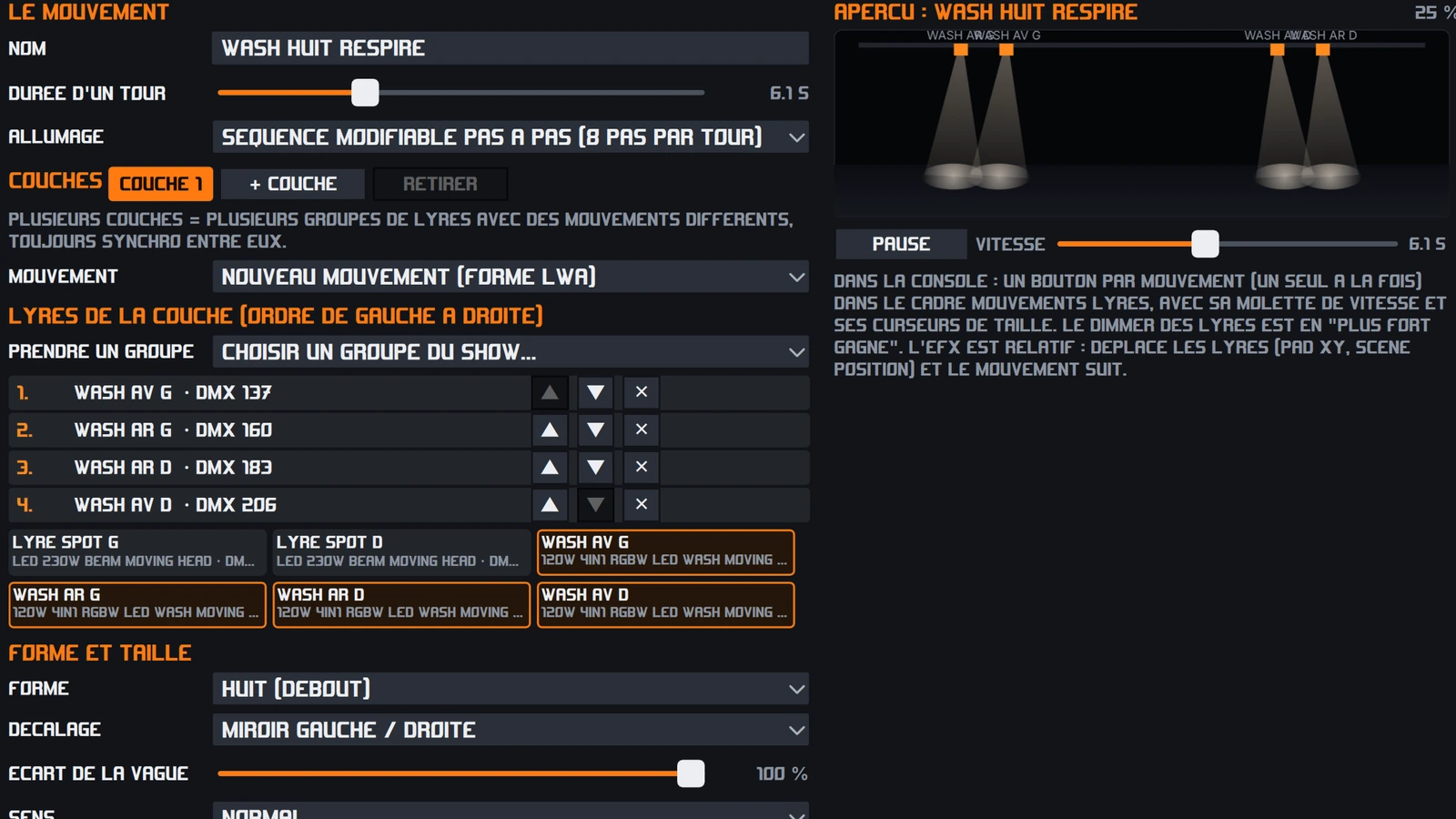
- Ballyhoo: the moving heads sweep the room, ideal on a chorus.
- Wave: the moving heads follow each other with an offset.
- Figure eight and circle: soft shapes for moody parts.
- Fan and mirror: the moving heads on the left answer those on the right.
- Fixed positions: on the singer, on the audience, on the ceiling.
The secret: lock the speed to the song's tempo. One figure-eight cycle over 2 or 4 bars reads well. A movement that's too fast tires the eye, and the motors.
Three real-world cases
Covers band, four moving heads on the back truss. Two fixed positions (on the singer, as a top light on the stage), a slow figure eight for the ballads, a ballyhoo for the choruses. The tempo is tapped at the side of the stage or follows the audio from the mixer.
Wedding DJ, two moving heads on stands. The moving heads stay above people's heads, never on the newlyweds' table. A gentle wave during dinner, a ballyhoo for the first dance, a fast movement saved for the drop.
Village hall or association, borrowed gear. The moving heads are never rigged in the same place. Redo the center test at every setup and adjust the limits: two minutes that keep a beam out of the audience.
Never blind the audience
Set pan and tilt limits: the moving head never goes below a certain angle, whatever the movement. Aim above the audience's heads, over 2.50 m, not at their faces. On stage, avoid keeping a full beam on the musicians: they need to see their instruments.
Common mistakes
- Different DMX mode between the moving head and the software: the color channel drives the gobo, the tilt makes it strobe.
- Overlapping addresses: two moving heads go haywire at the same time.
- No terminator on a long line: the moving heads shake or jump.
- Motor speed at maximum on a slow movement: the heads move in jerks.
- Shutter closed: the moving head moves but gives no light. Open the shutter and raise the dimmer.
With LWA Light
LWA Light Controleur is moving head DMX software for Windows, Mac and Linux. Its library holds more than 1,700 fixtures; a missing moving head is created in the fixture editor from its manual. It outputs DMX-USB, Art-Net and sACN.
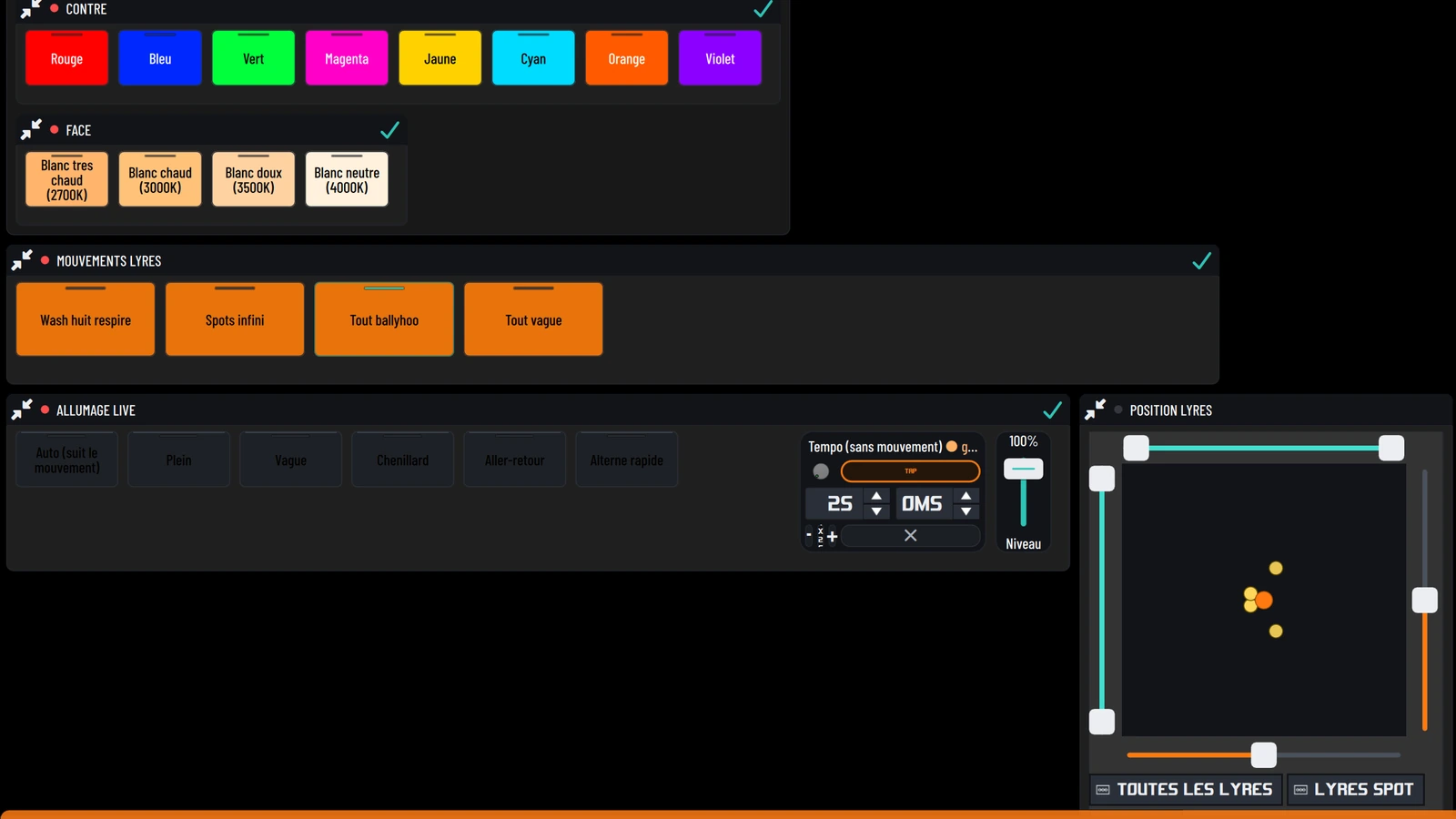
The Wizard asks for your fixtures and where they are, then builds the console: colors, movements, Head Lighting and XY pad. The Movements tool offers ready-made movements (ballyhoo, waves, figure eight…), on one or more layers of synchronized moving heads. If a moving head goes the wrong way, its mounting settings fix the pan, the tilt or the mirror. The Head Lighting tool makes the dimmer breathe or flash to the tempo.
The XY pad positions your moving heads and sets their limits: every movement, presets included, stays inside that frame. You adjust it with the mouse or from your phone with the free remote. Big FX mix moving heads and PARs on a single button, always held in by the XY pad. The tempo comes from tap tempo, Audio Live, MIDI Clock or the decks via Pro DJ Link. The details are on the tools page.
Frequently asked questions
How many moving heads can you control with a DMX-USB interface?
An interface outputs one universe of 512 channels, about thirty 16-channel moving heads. Beyond about thirty devices on the same line, add a DMX splitter. For several universes, use Art-Net or sACN nodes.
Do you need a MIDI controller to control moving heads?
No. A mouse, a touchscreen or the remote on your phone is enough. A MIDI controller puts real faders under your fingers: around forty models are recognized without setup, the others work in “learn” mode.
My moving head isn't in the library, what can I do?
Check the list of compatible fixtures on the Hardware page. If it's missing, create its profile in the fixture editor by copying the DMX chart from the manual, or send us the manual: we'll create the profile.
One of my moving heads goes the wrong way, why?
It's mounted upside down or turned compared with the others. In the Movements tool, the mounting settings invert the pan or the tilt, or apply a left / right or up / down mirror.
Can the moving heads follow the music on their own?
Yes. All movements follow one master tempo: tap tempo, Audio Live plugged into the mixing desk, MIDI Clock or Pro DJ Link for the DJ's decks.
Can I try before buying?
Yes: 30 days with every tool and live DMX output. A short demo pause comes back every 10 minutes after 20 minutes of use. The Live edition costs 189 € incl. VAT as a launch offer, lifetime licence.
Try LWA Light for free
30 days, every tool unlocked, on Windows, Mac or Linux.