
Programming moving heads with no prior knowledge: the simple method
You bought moving heads, and the manual talks about channels, pan, tilt and values from 0 to 255? Don't panic: with the right method, moving heads can be programmed without knowing anything about DMX. Here's what you need to know, step by step.
Why moving heads are intimidating
A moving head often uses 10 to 20 channels: pan, tilt, fine settings, speed, dimmer, shutter, colors, gobos, prism… On a classic console, every position is set channel by channel, then every movement is written step by step. For four moving heads, that quickly takes a whole evening, and everything has to be redone if one moves.
The good news: modern software does this work for you. It reads your moving heads' profiles, calculates the positions and offers ready-made movements. You choose, it programs.
The four things to know, not one more
- DMX address and mode: each moving head has a start address and a number of channels (its mode), chosen in its menu. The DMX addressing guide explains the math.
- Pan and tilt: pan turns the head left and right, tilt moves it up and down. Every position is a pan / tilt pair.
- Dimmer and shutter: the dimmer sets the output, the shutter opens the beam or makes it strobe. A head that moves without lighting usually has its shutter closed.
- Color and gobo: a color wheel or LED color mixing, and patterns (gobos) on spot and beam heads.
The rest (fine settings, motor speed, the value of each gobo) is handled by the software using the fixture profile.
The method in 6 steps
- Declare your moving heads: brand, model, mode and address. The software finds their channels in its library.
- Place them on the stage: back, front, floor, left or right. That's what lets the software aim accurately.
- Do the center test: all heads in the middle, beam open. A head pointing the opposite way is mounted upside down: invert its pan or tilt.
- Draw the allowed zone: the beams stay on the stage, the dance floor or the walls, never in the audience's eyes.
- Pick ready-made positions and movements: on the singer, on the audience, a slow figure eight, a ballyhoo, a wave. Check the preview, then try it on the real heads.
- Put it all on buttons, locked to the tempo. Your programming is done.
The six buttons you need to get started
- Singer position or center stage, in a warm color.
- Audience position, above people's heads, for the big moments.
- Slow figure eight for ambiance and slow songs.
- Ballyhoo for choruses.
- Lighting in tempo: the heads breathe or flash in rhythm.
- Stop and blackout, always within reach.
With these six buttons, your moving heads already look like a pro programmed them. The rest will come with practice.
Spot, wash or beam: what changes
Spots have gobos and often a prism: ideal for drawing patterns on the floor or a set. Washes give a wide, soft beam to color the stage; some have LED zones or a light ring that can be programmed too. Beams give a very tight beam, spectacular in haze: keep them above the audience. The method is the same for all three.
Common mistakes
- Different DMX mode between the moving head and the software: the color channel drives the gobo, the tilt makes it strobe.
- Overlapping addresses: two heads do the same thing without meaning to.
- No allowed zone: a movement ends up in the audience's eyes or on the ceiling.
- Movements too fast: they tire the eye and the motors. Lock them to 2 or 4 bars.
- Programming everything at once: start with six buttons, test for real, then add more.
With LWA Light
LWA Light Controleur is DMX software for Windows, Mac and Linux, designed for people who don't have hours to spend programming. Its library includes more than 1,700 fixtures.
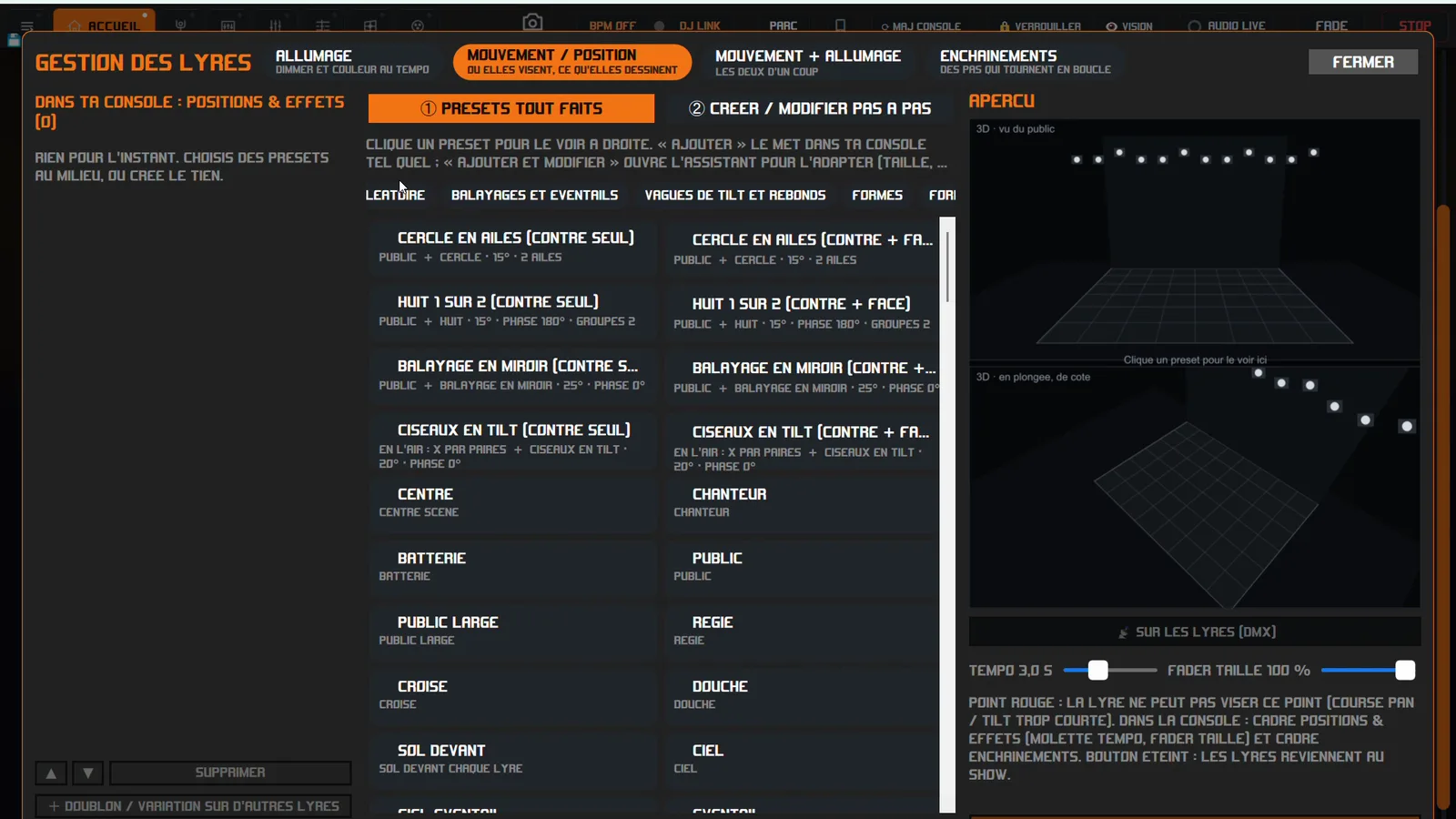
The Wizard asks for your fixtures and their positions, then builds the console in five minutes, moving heads included. The Moving Head Manager tool brings together lighting, positions, movements and sequences: more than 50 positions and 100 ready-made effects, with a 3D preview seen from the audience and from the side, or directly on your moving heads with “On the heads (DMX)”. The aim point can be set for all heads, the front, the back or a single head.
The XY pad draws the allowed zone: every movement, presets included, stays inside it. The Gobos / prism / zoom tool reads the gobos from each moving head's profile: one button per gobo, with its picture, no DMX values to look up. The details are on the tools page.
Frequently asked questions
Do I need to learn DMX to program moving heads?
No. You only need to know how to set each head's address and mode. Software that knows your moving heads' profiles takes care of the channels and values.
How long does it take to program four moving heads?
By hand on a console, count on an evening. With software that offers ready-made positions and movements, half an hour is enough, tests included.
My moving heads are from different brands, is that a problem?
No. Each head has its own profile: the software sends each one the right values, and the movements stay in sync.
One of my moving heads goes the wrong way, why?
It's mounted upside down or turned relative to the others. Invert its pan or tilt in the mounting settings: all movements are corrected at once.
Can I try before buying?
Yes: 30 days with all the tools and live DMX output. After that, one lifetime licence, all included: €189 incl. VAT as a launch offer.
Try LWA Light for free
30 days, every tool unlocked, on Windows, Mac or Linux.