
DMX software for DJs: which one to choose and how to get started
Some PARs, two or four moving heads, a strobe: a DJ quickly ends up with a real lighting rig. DMX software runs it from the computer, in time with the music, without spending your evenings programming. Here's what it should be able to do and how to set it up in half an hour.
Software or a small DMX console?
Small 192-channel DMX consoles have helped plenty of DJs get started. But every scene is programmed by hand, channel by channel, and moving heads quickly turn into a headache: pan, tilt, fine settings, colors, gobos… The tempo is set with one button, rarely more.
DMX software for DJs starts from your fixtures, not from their channels. It knows their profiles, offers ready-made effects, locks them to the BPM and puts everything on buttons. You save hours of preparation and get lighting that really follows the music.
What good DMX software for DJs should do
- Recognize your fixtures: a large library of profiles (PARs, moving heads, LED bars, strobes), and an easy way to add a missing model.
- Build the console for you: colors, PAR effects, moving head movements, strobe, blackout. A blank page means an evening of programming.
- Follow the tempo: tap tempo, MIDI Clock, Pro DJ Link for Pioneer DJ decks, or live listening to the music.
- Restrict the moving heads: a zone the beams never leave, so you never dazzle the dance floor or the newlyweds' table.
- A big effect on one button: for the drop, the first dance or the finale.
- Control without a mouse: MIDI controller, touchscreen or phone.
- Run on your computer: Windows or Mac, and a free trial long enough to test it at a real event.
The minimum gear
A computer (your mixing one or a second laptop), a DMX-USB interface and DMX cables daisy-chained, with a terminator on the last fixture. For a DJ, a single universe of 512 channels is plenty: eight PARs and four moving heads fit under 150 channels. Choosing the interface is covered in the DMX-USB interface guide.
Set up your lighting in 30 minutes
- Address your fixtures without overlaps and keep the plan in the flight case. The DMX addressing guide does the math with you.
- Plug the interface into the computer, then the DMX line. Check that the software sees it.
- Declare your rig: brand, model, DMX mode and position of each fixture (back, front, floor, moving heads on stands).
- Generate the console: colors, PAR effects, moving head movements and lighting, strobe, blackout.
- Set the moving head zone: above people's heads, never in their eyes.
- Choose the tempo source and test it on two tracks with very different BPMs.
- Keep at your fingertips an effects stop, a white flash and a fade to black.
A DJ console: twelve buttons are enough
A whole night fits on a dozen well-chosen controls:
- three or four ambient colors (warm for dinner, two-color for the dance floor);
- two PAR effects in tempo: a slow wave for verses, a chase for choruses;
- two moving head movements: a slow figure eight, a ballyhoo for choruses;
- a fixed position on the newlyweds or the center of the dance floor;
- a big effect for the drop, a strobe, a white flash;
- a stop and a blackout.
To time each effect to the right moment of the night, the DJ lighting software guide details the tempo sources and the effects for each moment.
When your hands aren't free
While you mix, the lighting shouldn't need your attention. Two options: a remote on your phone, next to the decks, or Audio Live. The software listens to the booth or rec output of the mixer, finds the BPM and develops the effects as the tracks go: verse, chorus, build-up, drop.
Common mistakes
- Choosing free blank-page software: it's powerful, but everything has to be programmed before the first gig.
- Different DMX mode between the fixture and the software: colors and movements go all over the place.
- Moving heads without limits: a ballyhoo in the guests' eyes is a guaranteed complaint.
- Non-stop strobe: it wears the room out in two minutes. Save it for the big moments.
- No test before the gig: test at home, with the lights on, then in the dark.
With LWA Light
LWA Light Controleur is DMX software for Windows, Mac and Linux, designed by event technicians. Its library includes more than 1,700 fixtures; it outputs DMX-USB, Art-Net and sACN.
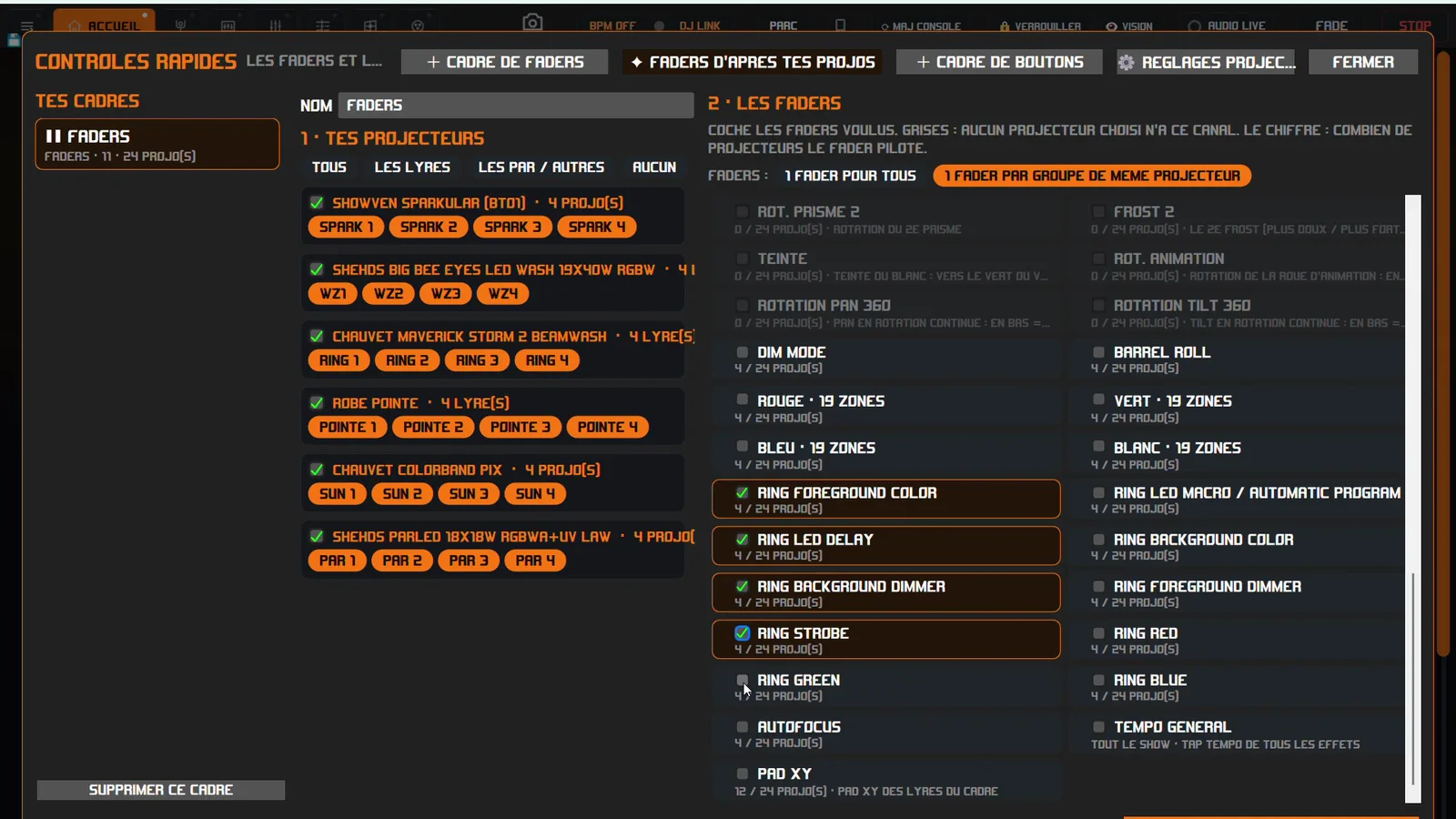
The Wizard asks for your fixtures and their positions, then builds the console in five minutes: colors, PAR effects, moving head movements and lighting, XY pad, tap tempo, flash, fade and stop. The Quick Controls tool adds the useful faders and buttons for your fixtures in three clicks: dimmer, colors, strobe, smoke, blackout. Big FX put PARs, moving heads and strobes on a single button for the drop.
The tempo comes from tap tempo, MIDI Clock, Pro DJ Link or Audio Live, which follows the structure of the tracks. The XY pad keeps the moving heads in their zone, whatever the effect. You control everything with the mouse, a MIDI controller or from your phone with the free remote. All the details are on the tools page.
Frequently asked questions
Is there free DMX software for DJs?
Yes, but free software usually starts from a blank page: every scene and every effect is programmed by hand. If your time matters, compare it with software that builds the console on its own, during its free trial.
Can I use the same computer for mixing and lighting?
Yes, a recent laptop runs both. Many DJs still prefer a second laptop for the lighting: a crash on one side doesn't stop the other.
Can the lighting follow my DJ software?
If your DJ software sends MIDI Clock (VirtualDJ, Traktor…), the lighting locks onto it: see the VirtualDJ guide. With networked Pioneer DJ decks, Pro DJ Link provides the tempo. Otherwise, audio live listens to the music and finds the BPM by itself.
How many fixtures for a wedding DJ?
Four to eight LED PARs, two to four moving heads, a strobe and a smoke machine cover a room of 150 people. It all fits in a single DMX universe.
Can I try before buying?
Yes: 30 days with all the tools and live DMX output. After that, one lifetime licence, all included: €189 incl. VAT as a launch offer.
Try LWA Light for free
30 days, every tool unlocked, on Windows, Mac or Linux.